
Edits audio files by adding effects and distortions, cutting, trimming, or joining multiple sounds together, changing the pitch levels, tempo, or loudness, etc. Record the audio from the microphone and convert between FLAC, WAV, AIFF, etc.
Except for a few features available exclusively in some professional audio editors of the highest level, there is no need to spend ridiculous amounts of money in professional audio tools when you can download and enjoy Audacity. This open-source development comes with all the utilities and features you need to produce high-quality audio files and to edit and enhance them just like with any high-end professional tool, and it comes with a feature that (as far as I know) no other commercial audio editor has ever dared to include in their product – accessibility features for persons with visual disabilities.
The program’s interface displays the expected wide clean area where the waveform graphs of your audio files will appear. Every graph comes with useful information about the file itself and with a zoom feature that allows you to work on the tiniest section of the file more accurately and intuitively. On the top side of the interface, you’ll find – together with the expected menu options and a set of quick-access icons – all the recording and playback controls you require to create and listen to your audio files. One of the few interface improvements I’d dare to suggest to the Audacity team refers to the possibility of having different tabs for the different audio files, as the program tends to open each of them on a different window.
The list of features availab
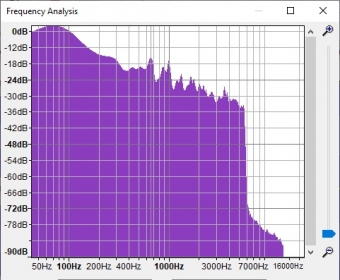
le largely exceeds the scope of this review – suffice it to say that the program offers everything you need to record new audio; digitize audio for analog sources; export and import (i.e., convert) audio files among the formats supported; enhance the sound quality; incorporate LADSPA, LV2, Nyquist, VST, and Audio Unit plug-ins; edit your audio files in any way imaginable; add effects and filters to them, and analyze (and visualize) their frequencies. As briefly mentioned above, Audacity counts with accessibility features that you won’t find easily in any other amateur or professional commercial editor. These features, which include a long list of keyboard shortcuts and access to most functionality via the keyboard, allow persons with a visual disability to make use of a software tool that usually relies heavily on graphs and images. It supports Jaws, NVDA, and other commonly used screen readers.
Due to copyright restrictions – and given that this is open source and therefore a completely free software tool – some common file formats are not supported. WAV, AIFF, and MP3, together with WMA and other known formats are fully supported, though.
Audacity is a full-fledged audio creator and editor developed by knowledgeable audio and software specialists that is not only free for everyone, but also useable by everyone, thanks to its uncommon and amazing support for accessibility features.






Comments (61)